The writing studio that stays in your browser
I write myself, and most of the writing tools I have tried either wanted an account, sent the manuscript to a server I don't control, or locked me into an annual subscription for features I already have in Word. A manuscript is the most personal thing an author owns — it shouldn't have to leave the computer to be written.
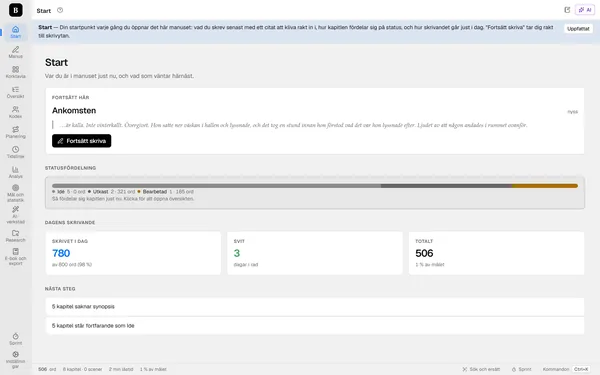
Zenmanus is a complete writing studio that runs entirely in the browser. Manuscripts and versions live on your own computer via IndexedDB, and the settings in your own localStorage. If you want AI help — an editorial report, a continuity check, a voice check, a tension curve across the whole book — you paste in your own key from the provider you already trust. The key never passes through me, because there is no server layer that could see it.
Built as an alternative to Scrivener, with everything that programme can do and a little more: Swedish language checking directly in the writing area, 47 AI tools that actually know the manuscript and the codex, and a finished EPUB workshop with a bookshop check built in.
In brief
Features
Manuscripts and versions are saved locally in the browser. Your AI key is sent only to the provider you choose yourself — never via me.
Directly in the writing area, built not to flag ordinary Swedish prose as an error — tested against innocent text, not only against AI-generated text.
Editorial report, continuity check, voice check, tension curve and ten dramatic templates — all aware of the codex and the chapters, not just what you paste in.
Who it is for
The manuscript tree, corkboard, timeline and codex keep a long manuscript in order over months.
No account, no server, no provider who can shut down and take your manuscript with them.
Open your .scriv project directly, or import DOCX, ODT, RTF and EPUB. A book in progress moves in without starting over.
Price
Zenmanus is free to use for now. You pay only your own AI provider directly, if and when you use the AI tools.
Free for now, with your own AI key
Status
The app is running at zenmanus.com. The writing area, manuscript tree, free corkboard, research folder, timeline, codex, track-changes mode, word-by-word version comparison, EPUB and DOCX export and the AI tools all work. Since September it is also possible to import a project directly from Scrivener and export it back. What remains before full parity with Scrivener is mainly screenwriting formats.
Go to zenmanus.com and try the sample manuscript — no account, no registration.
Visit zenmanus.com Contact me